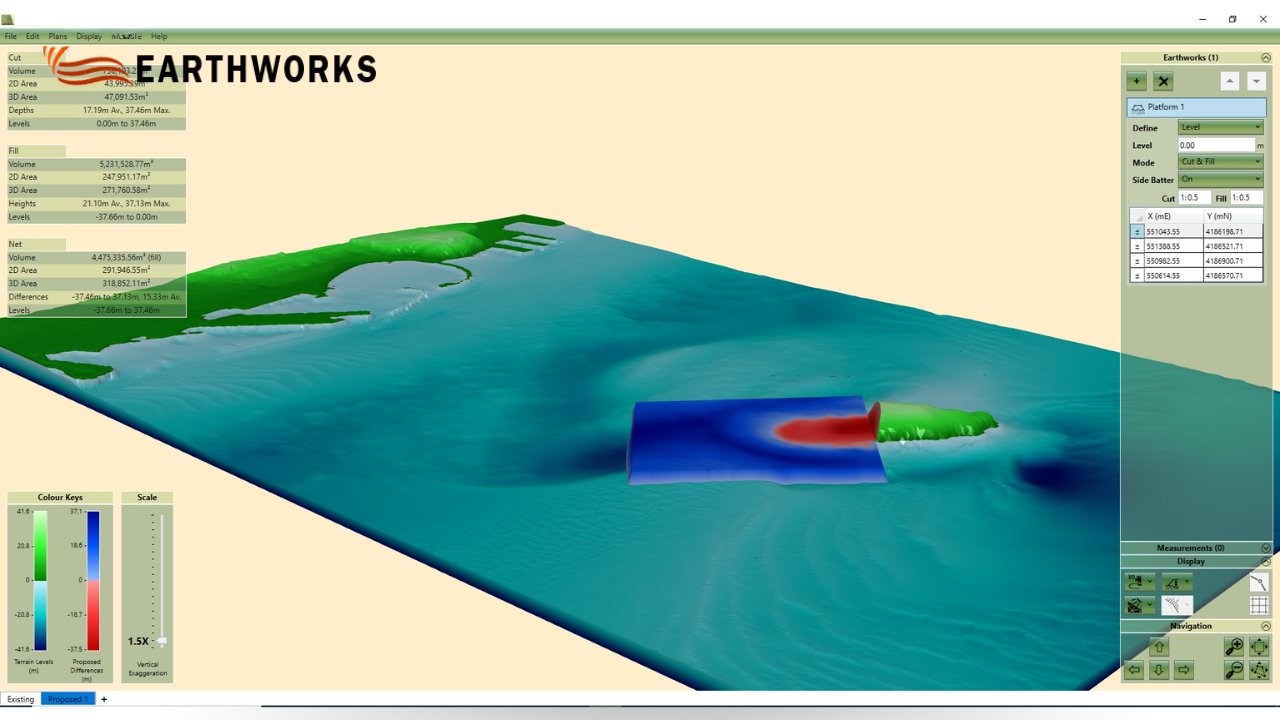
Cut and Fill Software: How It Improves Site Accuracy
Earthworks projects often look straightforward from the outside—move soil, level ground, and prepare the site. But is it really that simple when every cubic meter of material affects cost, design, and timelines? This is exactly where cut and fill software becomes essential for Earthworks, helping teams plan, measure, and balance site volumes with far greater accuracy before construction begins.
Thank you for reading this post, don't forget to subscribe!So what makes this process so important in modern land development, and why are more projects relying on it than ever before?
What Is Cut and Fill in Earthworks?
Have you ever looked at a sloped site and wondered how it becomes a flat construction zone?
That transformation happens through cut and fill operations.
In simple terms:
- Cut means removing excess soil from higher areas
- Fill means using that soil to raise lower areas
The goal is to balance the site so minimal material is wasted or transported externally.
In Earthworks projects, this balancing act is critical because:
- It reduces hauling costs
- It minimizes environmental impact
- It speeds up construction timelines
Without accurate planning, even a small imbalance can create major cost overruns.
Why Accuracy Matters in Earthworks Planning
Here’s a question most project managers eventually face: What happens if your soil volume estimates are wrong?
The answer is simple—everything becomes expensive.
Earthworks projects deal with natural material, and natural material is unpredictable. Soil behaves differently depending on:
- Moisture content
- Compaction levels
- Terrain conditions
- Excavation depth
Even a slight miscalculation can lead to:
- Too much soil being moved off-site
- Unexpected material shortages
- Delays in grading and leveling
- Increased machinery usage
This is why modern teams depend on cut and fill software instead of manual calculations. It brings precision into a process that used to rely heavily on estimates and experience alone.
How Cut and Fill Software Works
So how does a digital tool understand something as physical as land?
It all starts with data.
The software typically uses:
- Topographic survey data of the existing site
- Design models of the proposed surface
- Elevation points and contour maps
Then it compares the two surfaces and calculates differences in volume.
But what does that actually show you?
It reveals:
- How much soil needs to be removed
- How much needs to be added
- Whether the site has a cut or fill surplus
- How balanced the final design is
Instead of guessing, engineers get a visual breakdown of the entire site.
This is why cut and fill software has become a core planning tool in Earthworks rather than just an optional upgrade.
Common Problems in Earthworks Projects
Let’s break it down practically. What goes wrong on a site without proper planning?
Common challenges include:
- Over-ordering or under-ordering soil
- Inefficient truck routing
- Rework due to incorrect grading
- Budget overruns from poor estimation
Now here’s the important question—how does software fix this?
It helps by:
- Simulating earth movement before work starts
- Highlighting imbalances early in the design phase
- Optimizing cut and fill distribution across the site
- Reducing unnecessary hauling and machine time
In short, it turns guesswork into a controlled, measurable process.
Key Benefits of Cut and Fill Software
Why are so many contractors shifting to digital planning tools?
Because the benefits are practical, not theoretical:
Faster planning cycles – what once took days can now take hours
Improved cost control – fewer surprises during execution
Better resource allocation – machines and labor are used efficiently
Reduced waste – soil is reused instead of discarded
Clear reporting – easy communication between teams and stakeholders
For Earthworks teams, this means fewer delays and more predictable outcomes on site.
Who Uses Cut and Fill Software?
Is this only for large infrastructure companies?
Not at all.
Cut and fill planning tools are widely used by:
- Civil engineers
- Surveyors
- Site planners
- Infrastructure developers
- Land development contractors
Whether it’s a highway project or a housing development, the need for accuracy remains the same. Even within Earthworks operations, such planning approaches improve execution quality and reduce operational risks across projects.
Why Earthworks Is Moving Toward Digital Planning
Modern construction is changing. Faster timelines, tighter budgets, and higher expectations mean there is little room for error.
So why is digital planning becoming standard practice?
Because it delivers:
- Predictability in project execution
- Better coordination between design and field teams
- Reduced financial risk
- Stronger decision-making based on data
This is exactly where cut and fill software plays an important role in Earthworks operations—it helps connect design intent with on-site execution in a measurable way.
Manual Estimation vs Software-Based Planning
Manual estimation still exists in Earthworks, but it comes with clear limitations when compared to digital planning tools.
These methods may still work for:
- Small landscaping jobs
- Simple grading tasks
- Low-complexity sites
But when projects scale up, the risks increase significantly.
Manual estimation struggles with:
- Complex terrain modeling
- Large volume calculations
- Real-time design changes
That’s why most modern Earthworks teams now treat digital tools as a necessity rather than an option.
Final Thoughts
Earthworks is no longer just about moving soil—it’s about managing land intelligently, efficiently, and with precision. When every cubic meter matters, planning becomes just as important as execution.
That’s why cut and fill software has become a core part of modern Earthworks workflows. It reduces uncertainty, improves decision-making, and ensures that what is designed on paper can be built on site with confidence.
In the end, better planning doesn’t just save time—it improves the quality and reliability of the final site outcome.



Sai Vamshi
This is a paragraph.It is justify aligned. It gets really mad when people associate it with Justin Timberlake. Typically, justified is pretty straight laced. It likes everything to be in its place and not all cattywampus like the rest of the aligns. I am not saying that makes it better than the rest of the aligns, but it does tend to put off more of an elitist attitude.
Recent Comments