
Digital Takeoff Software for Construction | Earthworks Tool
By Sai Vamshi in Construction Estimating Software, earthworksos Posted April 24, 2026 Tags construction takeoff software,Digital Takeoff Software for Construction,earthworks software
Why Use Digital Takeoff Software for Construction?
Are you spending hours manually measuring plans and calculating materials for your construction projects? Small errors in estimates can contribute to time delays or additional costs on projects. Earthworks offers a practical solution with its digital takeoff software for construction.
This software helps contractors, estimators, and project managers work faster and more accurately. Let’s look at how it works and why it’s a game-changer for your next project.
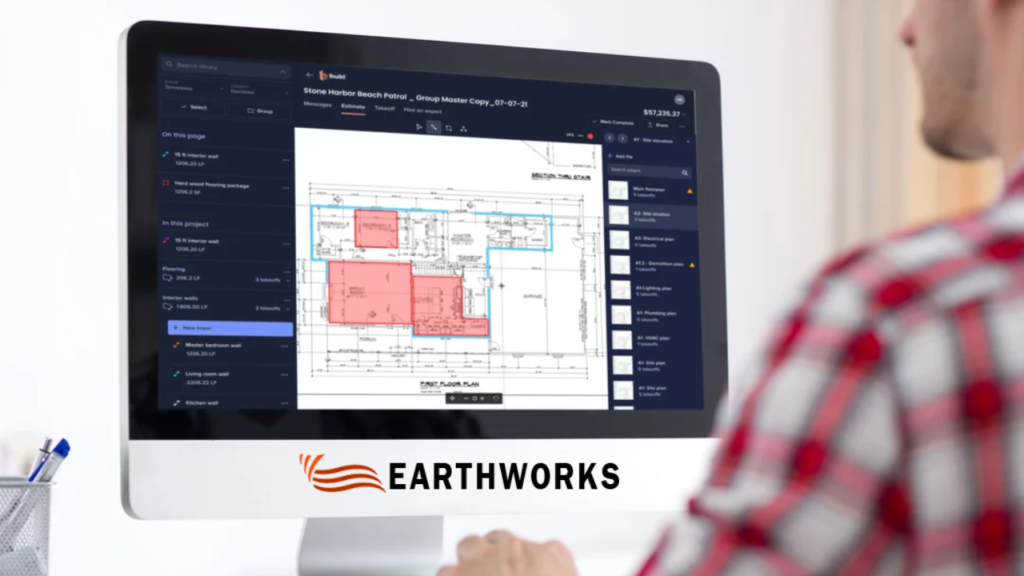
What Is Digital Takeoff Software for Construction?
In the past, takeoff meant using rulers, highlighters, and calculators on paper plans. Digital takeoff software for construction moves that entire process to your computer. You upload blueprints or CAD files, and the software calculates material quantities for you.
With Earthworks, you can:
Instant Measurements: Get areas, lengths, and volumes with a few clicks.
Automatic Material Count: Automatically tally items like concrete, steel, and lumber.
Quick Report Generation: Generate data for bids and project schedules.
Seamless Integration: Integrate with your existing estimating and management tools.
The result is a much faster workflow with fewer manual errors, helping teams work more efficiently.
Why Are Construction Teams Switching to Digital Takeoff Software?
Even experienced estimators may occasionally make mistakes when hand-calculating thousands of measurements. A single misplaced decimal point can lead to budget issues or potential delays. This is where Earthworks’ digital takeoff software for construction makes the difference.
Key Benefits:
Improved Accuracy: Reduce the risk of errors compared with manual calculations.
Time Savings: Tasks that previously took many hours can often be completed more efficiently with Earthworks, depending on project complexity.
Faster Bidding: Generating estimates faster can help you bid on more projects and potentially improve your chances of winning work.
Reduced Material Waste: Precise numbers mean you order exactly what you need, reducing leftover materials on-site.
How Does Earthworks Fit Into Your Daily Workflow?
You might already have an estimator on staff, but Earthworks isn’t meant to replace them—it’s meant to make them more powerful. It supports every stage of the build:
Pre-Construction Planning: Quickly scan blueprints to see if a project is even worth bidding on.
Estimating: Provide your clients with a detailed, professional breakdown of costs.
Project Tracking: Use the takeoff data to track material deliveries and monitor progress against your original plan.
By keeping all your measurements in one digital file, your entire team stays on the same page.
Is This Software Useful for Small Contractors?
Many small business owners think high-tech tools are only for giant firms. That isn’t the case. Even smaller teams can find value in using digital takeoff software for construction.
Small teams may benefit significantly from using digital takeoff software, depending on their workflow and project types. Cloud-based tools allow you to check plans from the truck or the job site for convenience. It’s easy to learn, works with standard PDFs, and can help reduce the risk of ordering mistakes, potentially saving costs over time.
What Features Should You Look for in a Takeoff Tool?
Not all software is built the same. When choosing a tool, you should look for:
User-Friendly Interface: If it’s too complicated, it may be challenging for your team to use effectively. Earthworks is designed with a minimal learning curve.
Compatibility: It needs to work with the files you already get from architects.
Support: Look for a company that offers tutorials and real person-to-person help.
Common Questions
-
Is it hard to learn?
No. Most users can perform basic takeoffs within their first hour of using the platform.
-
Does it work with my current plans?
Yes. It supports PDFs, CAD files, and even scanned paper blueprints.
-
Will it save me money?
By saving time on calculations and reducing material over-orders, many contractors report improved project efficiency.
Getting Started with Earthworks
Switching to a digital process is simpler than it sounds. Start by evaluating how long you currently spend on manual takeoffs. Try a demo of Earthworks in San Diego to see the tools in action. We recommend starting with one small project to get the hang of it before moving your entire company over.
Many users report finding it easier than paper-based methods and continue to use the software for future projects.
The Bottom Line
Construction is complicated enough without the stress of manual math. Digital takeoff software for construction is a practical tool that saves time and improves your bottom line. Having accurate data can play an important role in maintaining competitiveness in today’s fast-moving industry.
READ MORE

Recent Comments